Seams From UV Islands
Seams From UV Islands converts the borders of the active UV map's islands back into mesh seams. Use it when the UV layout already describes the cuts you want, and you need the 3D mesh seam flags to match those island boundaries.
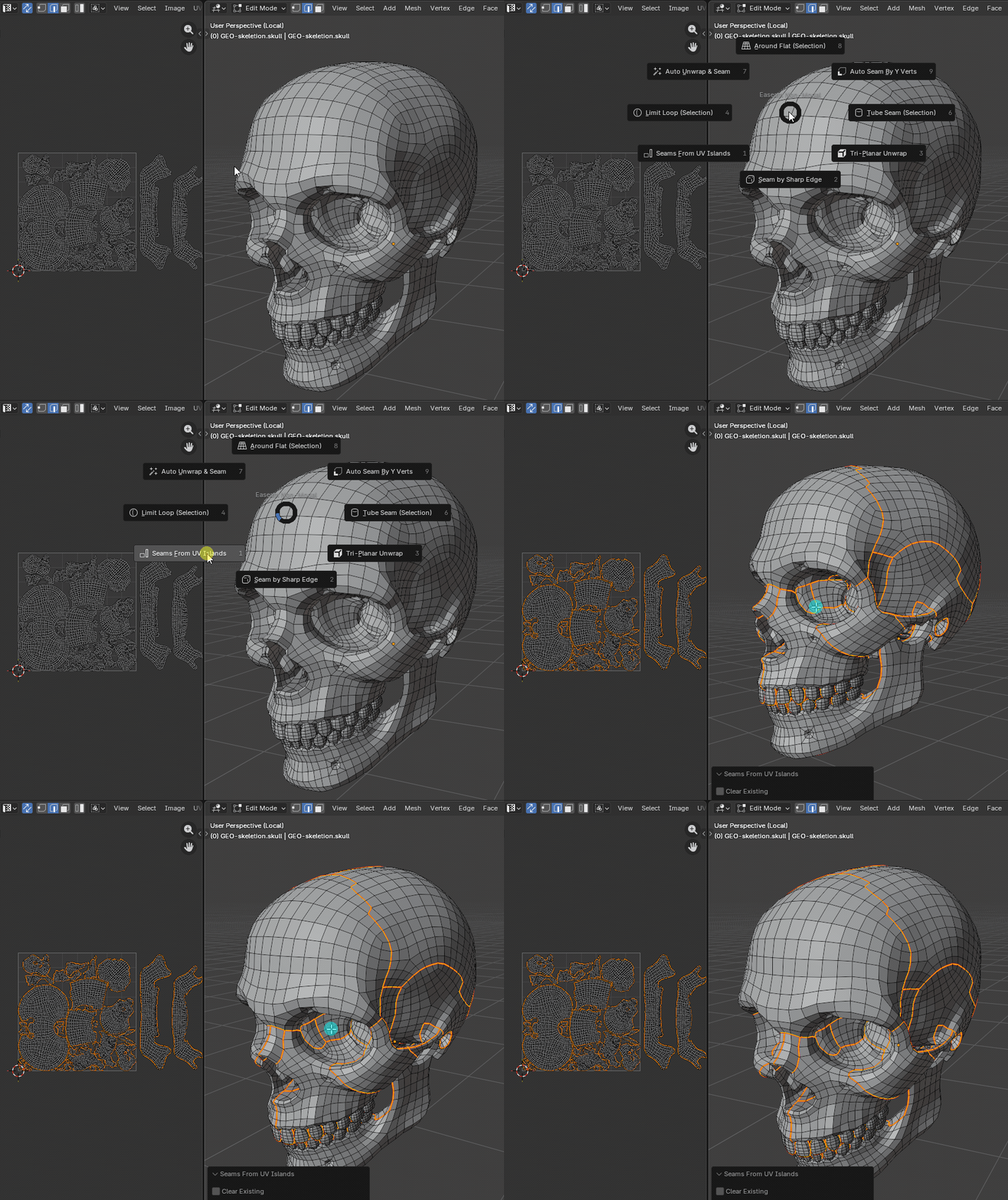
What it does
- Reads the active UV map on each edit-mode mesh object.
- Detects edges where linked faces use different UV coordinates along the same mesh edge.
- Marks those UV island border edges as seams.
- Selects the newly marked seam edges after the operation.
- Optionally clears existing seams before marking the UV island borders.
- Supports multi-object edit sessions.
- Skips edit-mode mesh objects that do not have an active UV map.
Where to find it
View3D > Sidebar > Easeam > Non-Modal Tools > Seams From UV IslandsView3D > Mesh Edit Mode > Alt + S > Non-Modal Tools > Seams From UV Islands
Best use cases
Use it when the UV islands are already correct and the mesh seams need to catch up:
- restoring seams after importing or editing a UV layout
- turning a manually edited UV layout into visible mesh seam boundaries
- cleaning up seam data after Smart UV Project or other unwrap workflows
- checking which mesh edges define the current UV islands
- transferring UV island borders into seam-based Easeam workflows
The operator depends on the active UV map. If the object has multiple UV maps, make sure the intended map is active before running it.
Workflow
- Select a mesh object with UVs and enter Edit Mode.
- Make the UV map you want to read the active UV map.
- Run
Seams From UV Islands. - Enable
Clear Existingin the operator panel or redo panel when you want the result to replace the current seam set. - Confirm the marked and selected seam edges.
If no edit-mode mesh object has an active UV map, the operator cancels and reports No edit-mode mesh object has an active UV map.
Settings
Clear Existing
Clears all existing seams on each processed mesh before marking seams from UV island borders.
Default: Off
Leave this disabled when you want to add UV island border seams to the current seam set. Enable it when the active UV layout should become the full source of truth for mesh seams.
How selection is handled
For each edit-mode mesh object, Easeam switches to edge select mode, clears the current vertex, edge, and face selection, then selects only the edges it marks from UV island borders.
Edges hidden in Edit Mode are ignored. Boundary edges and loose edges are not treated as UV island borders by this operator; it looks for shared mesh edges whose linked faces are separated in UV space.
After it finishes, Easeam restores the original active object and mesh selection mode.
Tips
- Set the correct active UV map before running the operator on objects with multiple UV channels.
- Use
Clear Existingwhen you want the seam state to exactly follow the current UV islands. - Leave
Clear Existingoff when you are adding these seams to manually placed cuts. - Run this after generated unwraps when you want the island borders available as selectable mesh seams.