Seam by Sharp Edge
Seam by Sharp Edge turns sharp mesh edges into UV seams. It can read edges already marked sharp in Blender, detect edges by angle, or combine both methods before optionally unwrapping the affected islands.
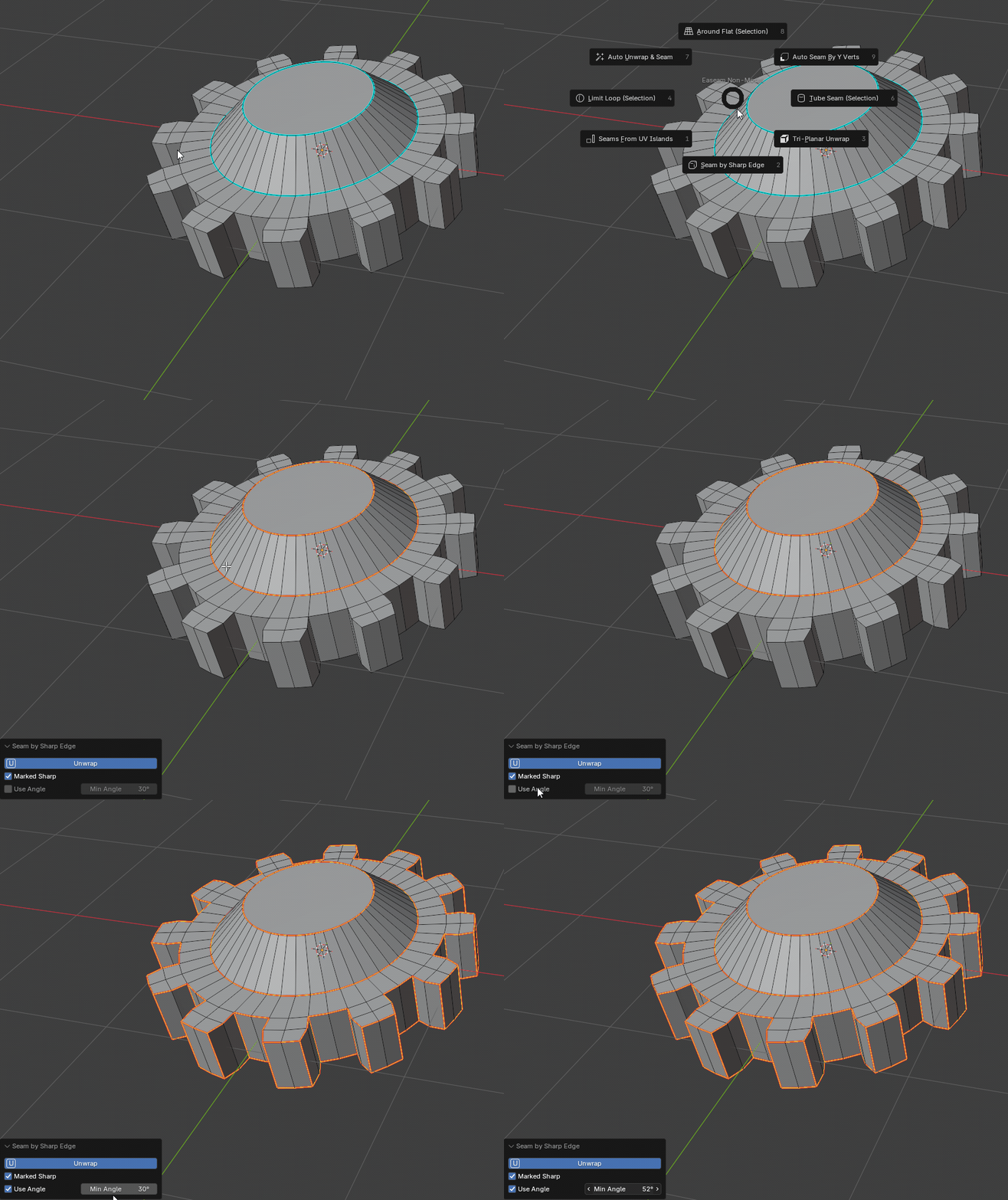
What it does
- Marks seams on edges that are already marked sharp.
- Can also select sharp edges by a minimum angle threshold.
- Combines marked-sharp and angle-based results when both options are enabled.
- Selects the seam edges it creates so the result is easy to inspect.
- Can unwrap the connected selection immediately after marking seams.
- Works in mesh Edit Mode on selected editable mesh objects.
Where to find it
View3D > Sidebar > Easeam > Non-Modal Tools > Seam by Sharp EdgeView3D > Mesh Edit Mode > Alt + S > Seam by Sharp Edge
Best use cases
Use it when the model already has meaningful hard edges and you want UV seams to follow that hard-surface structure:
- converting Blender sharp-edge markings into seam cuts
- creating quick seams for hard-surface props and mechanical forms
- using an angle threshold to find major silhouette or panel breaks
- preparing a fast unwrap from existing normal-smoothing boundaries
- combining manually marked sharp edges with automatically detected sharp corners
Workflow
- Select a mesh object and enter Edit Mode.
- Mark any edges as sharp if you want to use Blender's existing sharp-edge flags.
- Run
Seam by Sharp Edge. - Enable
Marked Sharp,Use Angle, or both in the operator panel. - Adjust
Min AnglewhenUse Angleis enabled. - Leave
Unwrapenabled when you want Easeam to unwrap after marking the seams. - Confirm the selected seam edges in the viewport.
Settings
Unwrap
Runs an unwrap after marking the seam edges.
Default: On
Use this for a quick mark-and-unwrap pass. Turn it off when you only want to create or inspect seams before unwrapping later.
Marked Sharp
Marks seams on edges that already have Blender's sharp flag.
Default: On
This is the safest option when you have intentionally authored sharp edges and want the seam layout to match them.
Use Angle
Finds sharp edges from the current Min Angle value and marks those edges as seams.
Default: Off
Enable this when the mesh does not already have sharp edges marked, or when you want to add angle-detected cuts to the marked-sharp result.
Min Angle
Sets the minimum angle used by Use Angle.
Default: 30 degrees
Lower values catch more edges. Higher values limit the result to stronger corners and larger directional changes.
Tips
- Keep
Marked Sharpenabled for authored hard-surface meshes where sharp flags already define the intended cuts. - Enable
Use Angleto generate a seam pass from geometry alone. - Combine both methods when some important edges are manually marked and others should be found by angle.
- Turn
Unwrapoff if you want to review the seam selection before running a separate unwrap operation.