Limit Loop (Selection)
Limit Loop (Selection) is the one-shot version of Seam Edge Loop. Select one or more seed edges, run the operator, and Easeam follows the edge loop from that selection while stopping at existing seam boundaries.
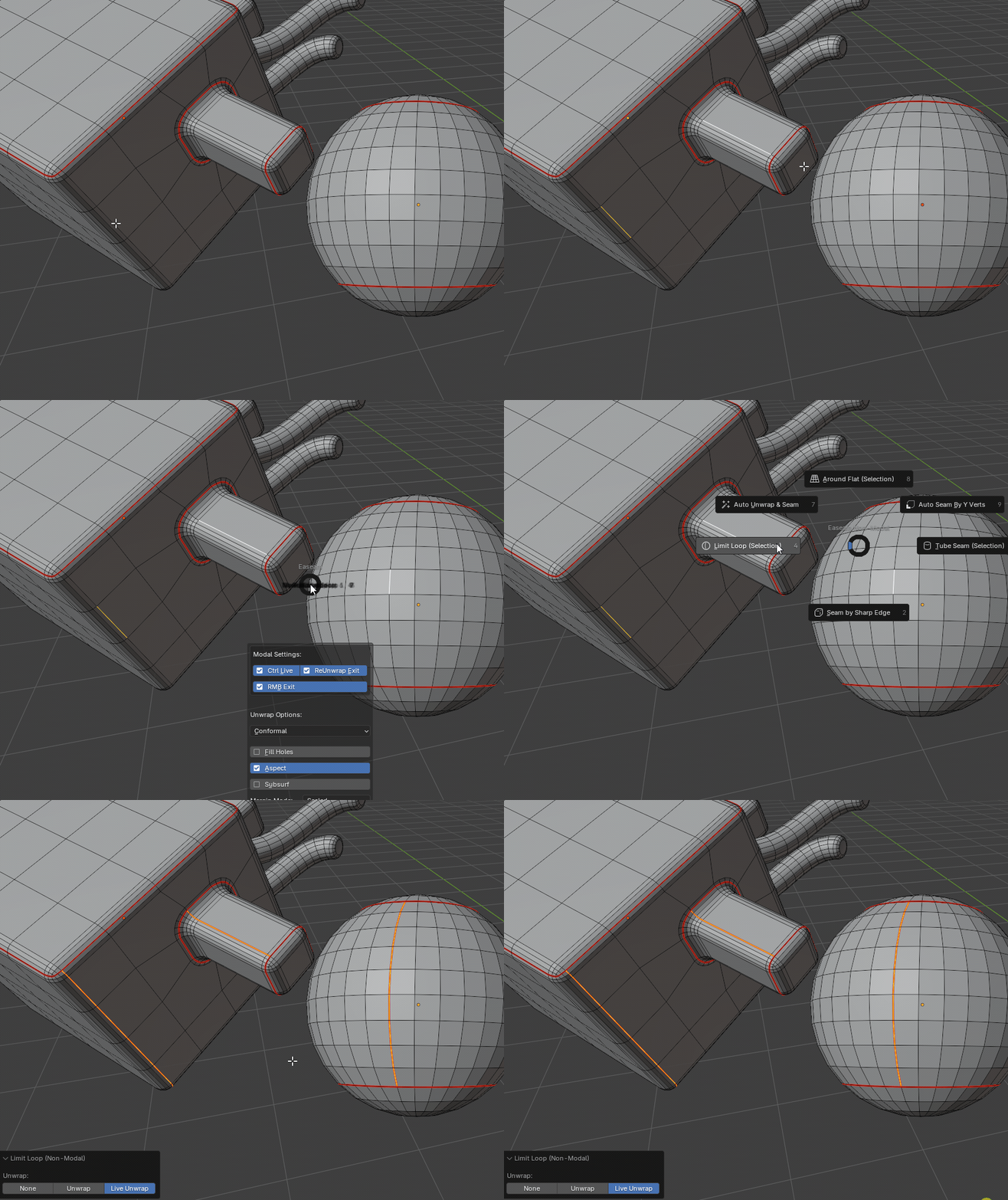
What it does
- Uses the currently selected edges as seed edges.
- Selects the connected edge loop from each seed selection.
- Stops at edges that are already marked as seams.
- Marks the resulting loop edges as seams.
- Leaves the final loop edges selected after the operation.
- Supports multi-object edit sessions.
- Can mark only, unwrap the affected island, or use Blender Live Unwrap.
Where to find it
View3D > Sidebar > Easeam > Non-Modal Tools > Limit Loop (Selection)View3D > Mesh Edit Mode > Alt + S > Non-Modal Tools > Limit Loop (Selection)
Best use cases
Use it when the seam should follow Blender's edge-loop selection from edges you already picked:
- quad-based hard-surface loops
- cylinder and tube loop boundaries
- panel, bevel, socket, and inset borders
- finishing UV island boundaries after other seams are already marked
- repeating loop seam placement across multiple edit-mode mesh objects
The operator depends on the mesh topology Blender sees from the selected edge. Clean loops produce the clearest results.
Workflow
- Select a mesh object and enter Edit Mode.
- Select one or more seed edges.
- Run
Limit Loop (Selection). - Set the
Unwrapoption in the operator panel or redo panel. - Confirm the operation.
If no edges are selected, the operator cancels and reports Select at least one edge.
Settings
Unwrap
Controls what Easeam unwraps after marking the loop seams.
| Mode | Behavior |
|---|---|
None | Only marks seams. |
Unwrap | Marks seams, selects the linked area delimited by seams, then unwraps it. |
Live Unwrap | Enables Blender Live Unwrap while the seams are marked. |
How selection is handled
For each edit-mode mesh object, Easeam gathers the edges that were selected before the operator runs. Objects without selected edges are skipped.
The operator switches to edge select mode, restores the seed edges on each processed object, runs Blender's edge-loop selection with seams as the delimiter, marks the selected loop as seam, and stores that final loop selection.
After it finishes, Easeam restores the original active object, mesh selection mode, and Live Unwrap state.
Tips
- Mark blocking seams first when you want the loop to stop at a specific UV island boundary.
- If the result follows an unexpected path, try a different seed edge on the same intended loop.
- Use
Nonewhile placing several seam loops, then switch toUnwrapwhen you want UV feedback for the affected island. - Use this on predictable quad loops where Blender can infer the loop direction cleanly.